

This article contains information related to Linux File system, Virtual File System, Superblock, inode, dentry, fd concepts with examples.
I discussed about status command(stat) the last blog post. I also discussed using mount command to display all filesystem types. I strongly recommend you to read earlier blogs for better understanding . If you find something missing, Please provide feedback in comment box so that I can take corrective action.
Here is big picture of Linux File system working principle. The Linux VFS(Virtual File System) here depends on
- Metadata of Filesystem i.e. Superblock created after file sytem mounting
- Metadata of File object i.e inode Constructed when file is created
- inode link to name & parent by dentry(Directory Entry)
- File Descriptor i.e fd assigned when file is opened
- File which contains a stream of bytes in a particular format
Block Diagram from Anatomy of the Linux File System

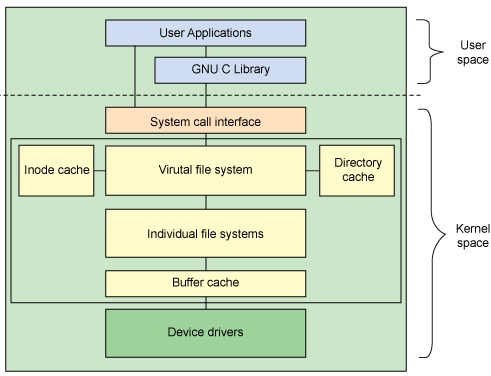
Both user and kernel works in their virtual address space. User application will make use of syscall to access a file. Here is another important link for FD.
Process Specific Information
As we noticed that Kernel mounts the root file system after booting at / . One of the important file sytem type is /proc which provides information related to processes(Active Programs) .
- /proc/cpuinfo provides information similar to system in Windows
sanjay@sanjay-VirtualBox:~$ cat /proc/cpuinfo
processor : 0
vendor_id : GenuineIntel
cpu family : 6
model : 142
model name : Intel(R) Core(TM) i5-7200U CPU @ 2.50GHz
stepping : 9
cpu MHz : 2711.998
cache size : 3072 KB
- Whenever a process is created, By default it will have
- stdin(0),stdout(1),stderr(2),255 file descriptors. 255 is trick to keep copy of these during redirection.
- You may use ps or echo $$ to display process ID
Can we analyze the process of FD allocation ?
sanjay@sanjay-VirtualBox:~$ ls /proc/$/fd
0 1 2 255
Here is one example of file opened using command exec . As per POSIX description of exec: execute commands and open, close, or copy file descriptors
- Following will open the test6 file and assign fd automatically
sanjay@sanjay-VirtualBox:~/linux_day3$ exec {myfd}<>test6
sanjay@sanjay-VirtualBox:~/linux_day3$ echo $myfd 10
sanjay@sanjay-VirtualBox:~/linux_day3$ ls /proc/$/fd 0 1 10 2 255 //Close File , Will be automatically closed when script/shell exits
sanjay@sanjay-VirtualBox:~/linux_day3$ exec 10>&-
sanjay@sanjay-VirtualBox:~/linux_day3$ ls /proc/$/fd 0 1 2 255
How to check all open files by a process ?
lsof lists all the open files on the system and background processes . We can also list files open for a particular process using -p option
sanjay@sanjay-VirtualBox:~/linux_day3$ lsof -p $ COMMAND PID USER FD TYPE DEVICE SIZE/OFF NODE NAME bash 10426 sanjay cwd DIR 8,1 4096 2257750 /home/sanjay/linux_day3 bash 10426 sanjay rtd DIR 8,1 4096 2 / bash 10426 sanjay txt REG 8,1 1037528 3407879 /bin/bash bash 10426 sanjay mem REG 8,1 47600 5785749 /lib/x86_64-linux-gnu/libnss_files-2.23.so bash 10426 sanjay mem REG 8,1 47648 5785753 /lib/x86_64-linux-gnu/libnss_nis-2.23.so :::::::::::::::::::::::::::::::::::::::::::::::::::::::::::::::::::::::::::::::::::::::::::::: bash 10426 sanjay mem REG 8,1 26258 790384 /usr/lib/x86_64-linux-gnu/gconv/gconv-modules.cache bash 10426 sanjay 0u CHR 136,2 0t0 5 /dev/pts/2 bash 10426 sanjay 1u CHR 136,2 0t0 5 /dev/pts/2 bash 10426 sanjay 2u CHR 136,2 0t0 5 /dev/pts/2 bash 10426 sanjay 255u CHR 136,2 0t0 5 /dev/pts/2
- cwd : Current working directory
- rtd: Root directory
- REG: Regular file
- txt: Program text (code and Data)
- mem: memory mapped file
- u: read & write access
- Further detail can be found by man lsof
You may like to look at Redirection
References
This article is discussed at Linux File System
Thanks for reading till end. I am trying to improve usability of my site. Did you find this discussion helpful ? If so, Please subscribe to YouTube channel Embedkari as well for additional embedded related stuff.